
4. Customization
This is the fourth guide in the 4-part Getting Started with Scroll series.
Display Settings
Overview
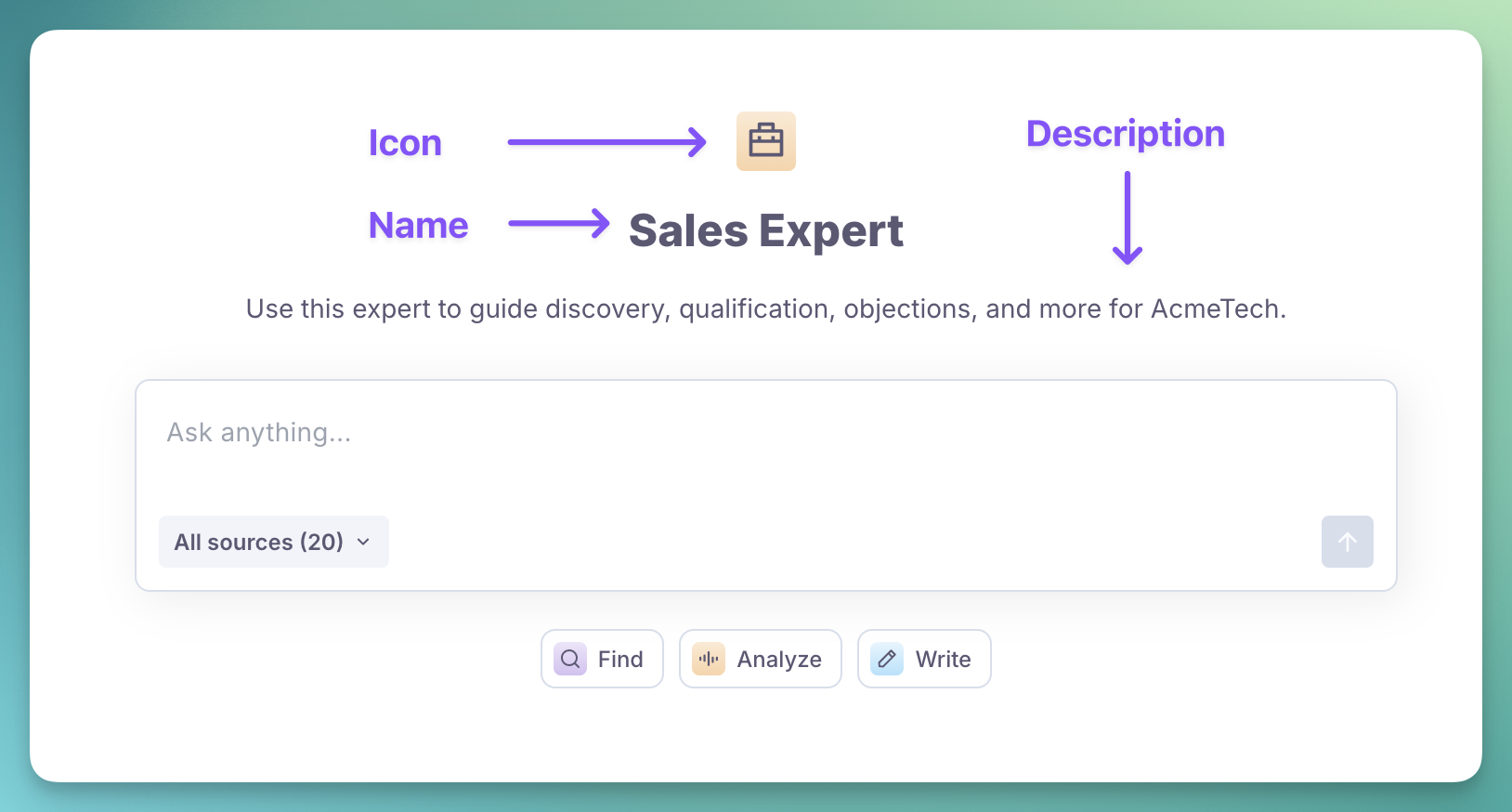
There are three things you can change in how your expert is presented to end users:
Element | Description |
|---|---|
How Scroll refers to the expert in emails, menus and other areas. | |
A short text shown to users when they start a conversation. | |
Icon | Custom color and shape to make your expert stand out. |
How to customize
Go to
Expert customizationin the navigation menuClick on the
iconto change its color and shapeEdit the
NameandDescriptionfieldsWhen you're done - click on the
Save changesbutton at the bottom of the screen

🏷️ Expert Name
The expert name should be self-explanatory and concise. Keep it under 20 characters.
Your users may have tens of experts in their accounts, so make it easy for them to understand what yours is about.
Below are some example names for inspiration, depending on the expert type:
Type of Expert | Example Titles |
|---|---|
RFP / Security Questionnaires |
|
Consulting |
|
Sales Enablement |
|
Subject Matter Expert |
|
Use simple, direct names. Dropping articles like 'The' keeps expert names cleaner and easier to scan.
📝 Expert Description
A strong description does two things:
Advertises the value of the expert to end users
Defines the scope of what the expert can and cannot do
Aim to keep it under 20 words.
Type of Expert | Example Descriptions |
|---|---|
RFP / Security Questionnaires | Backed by AcmeTech's full security and compliance library, this expert helps you complete questionnaires in minutes. |
Consulting | This expert is your on-demand Inside Sales strategist, distilling my two award-winning books, top interviews, and years of newsletters into clear, actionable guidance. |
Sales Enablement | The go-to assistant for the AcmeTech sales team. Use it for discovery, qualification, objection handling and more. |
Subject Matter Expert | Ask this AI expert anything about GDPR compliance. Get precise, practical guidance grounded in the full GDPR framework and real-world best practice. |
Expert Guidelines
Overview
Use expert guidelines to shape how the expert responds.
Most guidelines fall into four categories:
Category | Description |
|---|---|
🧬 Identity | Who the expert understands itself to be |
🙌 Behavior | How it should handle specific types of queries |
🎨 Style | Tone, formatting and preferred terminology |
📚 Sourcing | Which sources it should rely on for each query |
Most experts use a mix of these categories.
How to customize
Go to
Expert customizationin the navigation menuScroll down to
Expert guidelinesEdit the guidelines
When you're done, click on the
Save changesbutton at the bottom of the screen
Expert guidelines are limited to 1,000 characters to preserve performance. It also forces you to be clear and precise about what you include.

🧬 Identity Examples
It helps to tell the AI expert where they work. This lets it handle queries like "do we support capability X" or "how are we better than competitor Y".
You work for AcmeTech Inc.
Some experts work best when they adopt a role. It gives them a clear perspective for their answers.
You are a virtual clone of Warren Buffett.
You give friendly advice drawn from decades of investing experience.
You can also mix role and workplace context:
You are a product marketer for AcmeTech.
You understand our industry well, including historical patterns & current trends.
You focus your answers on positioning and messaging.
🙌 Behavior Examples
People often have strong preferences for how their AI expert should act in specific situations.
For example, for a sales expert, one administrator might want a strict approach for qualification:
Be strict when qualifying potential deals.
Reject deals outright if the parameters don’t align
perfectly with the defined profiles.
Another might want a more permissive expert:
When qualifying potential deals, look for potential fit.
Even if a specific parameter misses the mark,
a strong combination of factors can still justify pursuing the deal.
For an expert that assists with RFPs and audits, you might want it to present your company in the best possible way:
Remain factual and accurate, yet always cast AcmeTech in a positive light.
For an expert that writes reports or long-form content, you might want it to incorporate quotations:
Add a few block quotes to your answers with quotable passages
from the source materials.
🎨 Style Examples
Your audience may benefit from a particular AI expert tone and voice.
For example, for an easy read:
Use simple, clear language.
Keep answers short.
Include a few relevant emojis to make the response easy to scan.
Avoid jargon unless the user introduces it first.
For professional environments where precision matters, including academia, journalism, and consulting:
Follow AP-style conventions.
Never use emojis.
Use precise terminology and avoid casual phrasing.
Present arguments clearly, with well structured paragraphs
and careful qualifications.
For a more companion-like expert:
Use a warm, friendly tone.
Include occasional witty observations or anecdotes to keep the conversation engaging.
Stay supportive and personable without being silly or unprofessional.
You can also enforce terminology preferences:
• Use “Attacker”, never “hacker” or “exploiter”
• Use “Access Token”, never “session key” or “login string”
• Use “Configuration Change”, never “release” or “deployment”
📚 Sourcing Examples
Sometimes you want the AI expert to rely on specific sources for particular query types.
For example, if the query relates to the API, only use sources from the API docs. This keeps answers focused and avoids irrelevant product materials.
If the query mentions the API or endpoints, only use documents from the “API Docs” folder.
You can apply the same idea to customer-facing content:
If you are asked to write a social post or outreach email,
avoid any sources from the "Internal-use" folder.